Some time back we were having trouble with one of our blogs losing its search rankings and we decided that maybe it was because Google didn’t like the number of affiliate links on the site. We had an affiliate link on just about every blog post and some blog posts had more than one.
So we decided that one way of solving this was to add the nofollow tag to each affiliate link. I’m not really sure whether this did the trick or not as a number of other factors came into play at the time to boost our rankings again but even so we continue to add nofollow as normal practice each time we add an affiliate link.
For those who at this point are wondering what the hec nofollow is, take a look at our detailed blog post on this subject – What is dofollow and nofollow?
So how do you go about adding nofollow to an affiliate link?
There are two ways actually. The first is a manual approach and the second automatic…well probably not totally automatic but it is a bit easier than the manual method.
Manual Method
This method is quite simple but does involve you playing around with the code. Now I am going to assume that you have already had a play around with HTML code at some point otherwise you probably wouldn’t know how to add the code for your affiliate links. If you are new to WordPress however you may be wondering just where the code is hidden.
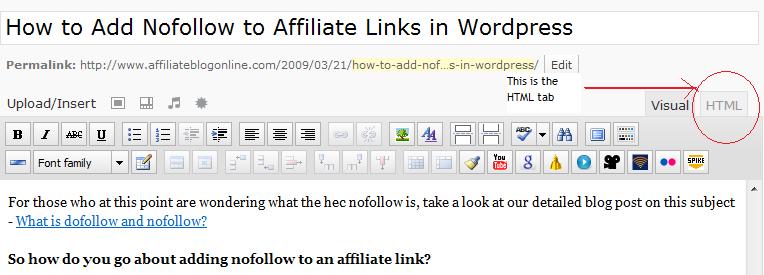
In WordPress it is found under the HTML tab. So when you are typing a blog post look up a little and you will see the HTML tab sitting just above the text box to the right.
Once you click on that tab you will see all the HTML code for the post your are writing. This is where you can insert the code for your affiliate links.
 |
Now that you have found the code you need to add the nofollow tag. Locate your affiliate link code in the html and then insert the nofollow tag which is rel=”nofollow” just after the url. So it will look something like this:
<a href=”http://www.afflilatesite.com?AID=12345″ rel=”nofollow”>Text Goes Here</a>
The affiliate code may look a bit different to the above but just look for the http link in the code and pop your nofollow tag just after it.
Automatic Method
This method I like because I don’t have to play around with the code. This involves using a plugin called TinyMCE Advanced. To upload this plugin to your WordPress blog take the following steps:
1. Click on Plugins–>Add New from the left hand side menu bar on your WordPress Dasboard. This may be in a different location depending on the version of WordPress you are using so you may need to look around for it. If you have a really old version of WordPress then you will need to upload the TinyMCE plugin using a program like Filezilla.
2. In the search field type in ‘tinymce’ and click Search Plugins. The TinyMce Advanced plugin will most likely be the first one in the list of results but if not, just take a look down the list until you see it.
3. Once you have find it in the list click the INSTALL link on the right hand side of the screen. This will install and activate the plugin for you.
4. The plugin will now be displayed in your menu on the left hand side of your dashboard. Scroll down and you will find it listed under the Settings option. If you can’t see it then the plugin probably isn’t activiated. If so, click on Plugins—>Installed and you will see the plugin in the list on that page. Simply click the Activate link to activate it.
5. You can go in and configure it if you like as TinyMCE has a lot of cool features but for the sake of what we are trying to achieve here you really don’t need to.
So now that you have installed the plugin you are ready to use it. To do this you simply click on the ADD NEW post link and start creating a post. You then add an affiliate link in your post which will display as a hyperlink – something like this –> Buy an Ipod.
 Highlight that link with your mouse and then click on the Insert/edit Link icon on your tool bar just above your post.
You should now have a pop-up menu on your screen. Click the ‘Advance’ tab on that pop-up and then the ‘Relationship Page to Target’ drop-down box. You will see ‘nofollow’ as one of the options. Just click that and then click Update. The ‘nofollow’ attribute should now be added to your affiliate link.

Sign up to the Newsletter
I've got nothing to give you but good advice, tips, hints and valuable information on how you can become a better blogger.

Very good post. I can say I learned something today. I just added the TinyMCE plugin to a couple of my blogs. Thanks.
It’s a great little plugin and has a load of features…most I haven’t even tried yet.
You gave a lot of info on this subject. Thanks for giving the dashboard pictures to help understand. I am more visual myself :-). I am a little lazy, so if i can have it done for me, i will take the plugin route. Not that it is that hard to add the code, i just like things as simple as possible. Great post!
I prefer images as well. “A picture paints a thousand words” they say.
very useful information, have you use the nofollow on your blog?
I use nofollow on affiliate links on all my blogs….well most of them as I remember.
This is an excellent tip, I don’t know why I never thought about it like this way, but it’s good to hear from you about the results latter!
Thanks a lot Paula for your visit to my blog and introducing me to your informative blog!
Stumbled upon your blog while searching for this topic – no follow on affiliate links – and this gave me the answer I needed. Thank you!
Been reading some of your blog posts – you have great information here and presented in a very clear fashion. Great blog!
Cheers
.-= Renae´s last blog ..Top Sea Kayaking Destinations =-.
I was really hoping others would weigh in one whether it would be best to nofollow affiliate links. Has anyone else tested how changing those types of links from dofollow to nofollow has affected your search rankings.
.-= Internet Strategist @GrowMap´s last blog ..FTC Disclosure Rules: What You Need to Do =-.
Hi Paula,
I love your info, but I have a couple of queries, which I hope you’ll clarify:
1. What themes do you use for your blog?
2. Do you have separate blogs for niches, or is it a mother portal with categories?
3. You and Wanda do 8 posts a day – is it about the same product or similar products?
I have been blogging for sometime and get lots of visitors but low conversions, I guess I will now follow you wonderful girls.
kishore
We use the Flexsqueeze theme for this blog and all of our niche product blogs.
We have seperate blogs and also a portal type blog.
We no longer add 8 posts a day. It is just too much work. It was great for getting traffic though but it’s not something we could have done forever. The articles that we did add were all of different products but they were in the same niche.
That’s great info, Paula. Two more doubts:
1. Do you only do Amazon books or other affiliate products from cj or clickbank too?
2. How long did it take you slow down from 8 posts a day to 4.
Thanks
Kishore
We don’t promote Amazon books – we promote Amazon products. And we also use CJ and Clickbank but not as much as Amazon.
I honestly can’t remember how long it took us to slow down to 4 posts. It might have been over a month maybe but I could be wrong.
Thanks your info. I noticed links in the reply are getting automatically linked to their sites. Is there a plugin for this and does it mask the link?
Thanks
Kishore
Yes it is a plugin. It is the Ninja Affiliate plugin. We definitely recommend it – makes it super easy to add affiliate links, or any links for that matter, to your site.
Tony Robbins says the fastest way to succed in life is to think, act, dream and even eat like the people you are trying to emulate. So, on the funnier side what do you girls eat? On a more serious note, I feel I am finally seeing light at the end of the tunnel, when I come to your blog.
Hi guys,
I think that adding ‘nofollow’ is important as I went through my Flip Over Saw Stuff blog adding the tag to everything and within a week it jumped from page 3 to the first page.
It tends to cycle between page 1 and 2 these days depending on ‘Google only knows’.
Thanks for the ‘real’ advice that you guys give out! I too love the transparent approach that you do! Why be shy and hide online, you wouldn’t ‘hide’ in your office in a ‘regular’ job would you?
Stay well
Ian
.-= Ian Anderson´s last blog ..Who tells children that flowers are weeds? =-.
I’ve been scratching my head as how to add nofollow to so many post i did before. Thanks to your post, i now know the existence of tinyMce! thanks mate.
Hi Wanda & Paula, thanks for the good info on “do/no follow”
I’m very new the the IM/AF/SEO world and have found the learning curve to be very steep indeed. :-)
I was surfing for nofollow info I found your site – great explaination – one more thing that I now understand and I will be checking all of my aff links to be sure.
Signed up for your newsletter –
thanks
Jay
hi.
Iam using CKeditor for editing my posts,can i still use it with the TinyMCE plugin?
Thanks
You’d probably have to ask the developers of the plugin that question. I’ve never used CKeditor.
Well, is m modifying the code allowed at Amazon? Cause I am afraid to not do any harm and get banned.
You might be better off emailing Amazon direct about it but I wouldn’t think that adding nofollow would be considered as ‘modifying the code’.
I noticed on my review site that whenever i added informative posts (not review with affiliate links), my rankings were steadily increasing. but when i added new reviews with affiliate links; ranking was either dropping or remained static at where it was already.
my cousin suggested the same thing that there are too many outbound links on my homepage. he suggested putting image links or flash links instead of text links. But using nofollow seems better option.
will do it and update you on any progress.
thanks for detailed advice.
We always use nofollow on our affiliate links. It’s just become a habit for us to do that. Hope it has worked for you.
Thanks Wanda and Paula,
I’ve been looking for a quick and easy way to add ‘no follow’ tags to my affiliate links for ages. I took your advice and added advanced Tinymce to my MMA training site. It works like a bomb and I’m sure it will help me to boost my rankings. I’ve just applied it to my main affiliate page and will be sorting through the others to add no follow. I’m excited to see what happens.
Hope it works for you Jonathan. It may take a bit of work to get all your affiliate links converted to nofollow but once you do it is simply a matter of adding the nofollow as you add new content.
i have been searching for how to add no follow tags for days. This is the easist tip I have came across. Thank you
Thank you! This is so helfpul. I have TinyMCE, but just couldn’t find the nofollow attribute hidden in the advanced screen.