Just recently we have started adding Amazon affiliate links to one of our niche blogs but we couldn’t quite work out how to add a product image link. It’s not as straight forward as adding a bit of code like you would do with say a Commission Junction product image link. We eventually bit the bullet and decided to get in there and see how it was done and we found that it isn’t that difficult after all. So here are the steps for anyone wanting to do the same thing.
Step 1: Upload an Image
First you need to find an image of the particular product. To do this just head over to Amazon and find the product page for that product. At the top left hand corner of every product page in Amazon is an image of the product. You just need to save that image to your computer. It doesn’t matter where you save it as long as you remember where.
Okay, so by now you probably have a blog post written in WordPress about that product so have that open on your screen. You would be in the edit post section of WordPress for that. Now you just want to upload the image to that blog post. Hopefully you know how to do this. It will depend on which version of WordPress you have but there will be an option to upload the image and place it into the blog post itself.
You should now have an image of the product displaying on your blog post but at this point it still doesn’t have a link to Amazon. In other words, if a reader were to click the image it would take them nowhere.
Step 2: Grab the Code
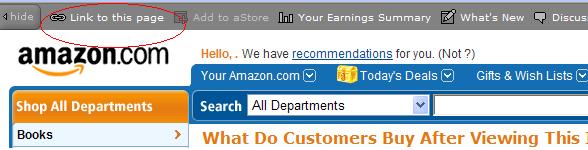
To get the image to click through to Amazon you need to add a bit of code behind the image. To do this you need to head back to Amazon to the product page you were on and click the LINK TO THIS PAGE option on the top menu bar. You need to be logged into your Amazon affiliate account in order to see this.
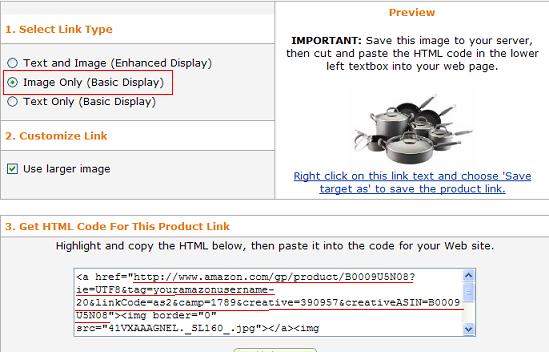
On this page select the Image Only option. This will display some code in the html box below it.
[UPDATE MARCH 2011: Amazon recently updated their system and no longer have an Image Only option. Simply select the TEXT ONLY option instead and this will still work.]
Now you need to pick up some of the code from that html box. We don’t want the entire piece of code. We actually just want everything between the first and second lot of quotes (see underlined in RED in the image above. Just copy that code as we will need it for the next step. Make sure you don’t include the quotation marks themselves. We just want everything from http to the next lot of quotation marks.
Step 3: Add the Code
 Now head back to your blog post. Click on the product image in your blog post to highlight it and then click the INSERT/EDIT LINK menu option on the blog post menu bar (see image above). You should get a little pop-up that lets you add URLs. Then just paste the code that you grabbed from Amazon into the LINK URL field. Click UPDATE and you are done.
To check that it is working just save your blog post and preview it in a browser and then click on the image. It should take you to that product page on Amazon.

Sign up to the Newsletter
I've got nothing to give you but good advice, tips, hints and valuable information on how you can become a better blogger.

Basically you need to think everything on your blog to monetize, a picture linked to amazon affiliate link. Good.
Great tutorial here…I’m wondering if you know how to get the Amazon Associates product images to work in the Text/HTML widget? For my blog they seem to only display on my site’s main page but not on any of the other posts or pages… I was thinking this might be related to where I uploaded the Amazon images to in my directory? any thoughts or ideas are appreciated…
I haven’t tried that myself so can’t really answer your question. However I did a bit of searching for you and came up with this blog post where the owner has used Amazon links in the sidebar so it may help…or at least get you closer to an answer.
http://blog-well.com/2008/05/20/how-to-display-ads-in-your-wordpress-sidebar/
Hi – this information is great. Just one question. If you are not picking up all the code, it means you are not picking up the bit that has your Amazon Affiliate ID – so, is your tracking code still working in this case?
Suzi
Just had another look – my mistake, I see it IS picking up the ID. Apologies!
Paula… You have saved my life.
I have used about every plugin out there and nothing worked.
This is exactly what I was looking for. I wasted 2 days looking for this.
Thank you sooo much for the info.
OH MY GOODNESS THANK YOU SO MUCH FOR THIS POST. I have been ready to rip my hair out for the last hour trying to figure out how to add it to my sidebar and the link you posted in the comments is gold.
Very glad to have found your site! Has a simple and straightforward solution. I would have pulled my hair out and wasted a lot of time. Glad I did a search right away instead!
how do I add the text and image link to my blog
Thank you sooo much for this post – It saved me a LOT of time!
Very good post. Helped me out a lot. Thanks. =]
Oh well done ladies!
You guys saved me a few more hair follicles because I didn’t need to work the whole amazon image thing out myself!
Awesome post, it really answers the problem.Wordpress is littered with unanswered forum requests to find the answer to this little conundrum!
So, I thought that I would google it and here I am. Just added you to my RSS feed and I look forward to seeing you around.
Many thanks again
Ian
p.s. I am just starting out and am looking to work from home so that I can be around for my kids as they grow up.
.-= Ian Anderson´s last blog ..The wonder of birds….. =-.
Thank you! I’ve been trying to figure out how to do this, and this was exactly what I needed! :)
This is exactly what I’m looking for! Thank you so much for the tips. :)
.-= Noel´s last blog ..Job Satisfaction Theory =-.
Thank you for this! I was going bananas trying to figure it out…this is what i neede. Specifying which part of the code is the one really needed was critical- I don´t understand why Amazon doesn´t do this! This is the url if you want to see what it now looks like http://www.maitravelsite.com/europe/madrid-cheap-eats/
Thanks!
Federico
maitravelsite dot com
Really useful as I’ve been so confused about how to do this!
Thank you
.-= vickie flores´s last blog ..test =-.
Ladies! I have tried ALL DAY to get this to work and then I finally found your fantastic step-by-step guide! You made it SO easy for me. I will absolutely be back in seek of more knowledge.
Can’t thank you enough!
Kim
.-= Kim´s last blog ..Grammar geeks rejoice – typos DO matter! =-.
Thanks, this helped me out! :)
Wanda & Paula,
Thanks for this tutorial. I’ve been using Amaniche on my Amazon affiliate sites, and find that all my sites load incredibly slow. I think part of the problem is all the images that are being brought over from Amazon as the page loads.
Am I correct in thinking that your technique places those images on my website’s server, and might make the page load a bit faster?
Our technique does mean that the pages load faster, but it is a manual process. Fortunately it’s not something that takes a lot of time to do.
Great post on how to add the image only to your Amazon link and make it work! Thank you for sharing!!!
Thank you very much for this tutorial. I have my own Image Consulting business and am in the process of setting up my own blog. This was much more straight forward then some of the other ones I have found out there.
do we need the code after the username, I tried adding the bit aftwards and also just to the username and both go to the amazon page, but wondering if they will still track?
You may not need it Andy but to be safe I still include it.
Hi Paula & Wanda,
First, thanks for this tutorial and for generously sharing your knowledge in The Amazonian Profit Plan ebook; it’s an excellent resource.
I’m just wondering why you download the product photo from Amazon and add the modified link rather than simply use the affiliate image link that Amazon provides. Is it so the photo can be sized better? so your page can load faster? or so you can add keyword focussed alt text? I couldn’t find the reason in your ebook and am curious.
I prefer to know that the image is always going to work. Whenever you use the affiliate image link from a merchant you never know if they are going to change the link at anytime. At least if I have saved the image to our site we know it will work.
Thanks Paula. Good point. Again, thanks for providing your ebook with such clear, doable instruction.
It also makes the image look more a part of YOUR content, rather than just plonked on to the page from amazon.
The text flows much better around properly inserted images as well, the unit from amazon can look like an advert and ignored by web savvy readers. IMHO of course!
I have been using this method successfully until today. I am trying to add Amazon links to my WordPress Blog and the Amazon “image only” link seems to be missing from the options. Now there is only a “text and image” and a “text only” option to choose from. I can’t seem to get this figured out. Any suggestions?
Amazon has changed their system in the past few weeks. Simply select ‘Text Only’ from step 2 above and you will still be able to grab the necessary code. It will still work for images.
Thank you very much for your post. I have spent hours trying to figure this out. I followed your instructions and it worked the first time. I feel so relieved!
Rebecca
Paula and Wanda you have helped me once again, really appreciate it. I tried using a redirect through cpanel but if you do that, you lose the image entirely which is not good.
Doesn’t this mean that the link will be “do follow” and help Amazon outrank you? I have tried your method along with adding the no follow attribute and I cannot get it to work.
Must be something wrong with my work.
The link will be dofollow. You will need to add rel=nofollow if you want the links to be nofollow. This is how we do it:
http://www.affiliateblogonline.com/2009/08/19/how-to-add-nofollow-to-affiliate-links-in-wordpress/
Hi ladies,
There must be a step I need to do. I followed all your steps to add the image to my blog however, when I click on the image in my post it does bring me to the product on Amazon, but of course my Affiliate name etc. is able to be seen by the buyer. I’m sure I must have to do something to make my personal info not visible. What am I doing wrong?
We don’t bother cloaking our links but we use a plugin on our site that could do it if we wanted to called Ninja Affiliate plugin.
You can also search for a free plugin. Just type in “cloaking link plugins” into Google and you will find plenty of them.
Thanks for your quick response. I wasn’t thinking about cloaking links, I was just worried that when someone is redirected back to my Amazon Associates account, that they would have access to the actual account details, like name address, payee info etc. How do I avoid that? Thanks again.
People who click on your affiliate link won’t ever be able to see your personal account details. You can only see those details because you are logged into your account. The only way someone would be able to see your account details is if they had your user name and password to your Amazon Associates account.
Thanks so much. I am pretty new at this and was concerned. I was hoping that’s how it works!
Hello everyone here. Good site this one, very helpful.
I have a question: I want to add a link “Text only” to one of my post how do I do it?
I tried to highlight the text where I want the people click on and then I added the code from Amazon to the Insert/edit link box wich make the text became blue but when I go to view my page there is nothing. The text where people have to click on is not there. What do I doing wrong?
PLEASE I need help with this.
THANKS in advance.
You can use the exact same code that you use for an image link. So take a look at the image in the post above with the text that is underlined in red. That is the code that you need to grab to put in the Insert/edit link box.
Thanks you Paula very muchn now is working.
Im a newbie, can i put banners, widgets etc, on each page of my site or can i only put one overall. I put one on my front page, and i chose another and it ask me if i wanted to use it to replace my other one. so, i just didnt answer because i didnt know what would happen. Newbie….gary p.s. my site is not completed yet, im just monitizing it at the moment.
You can put banners etc anywhere you like. I’m not sure why you were asked to choose to replace a previous one. Perhaps it is something in your theme itself.
if you click on the banner and it goes to amazon buy page, once the site is finished it should work for the customer right? thanks
As long as you have put in your code correctly it should all work perfectly.
Thanks so much! I had been going crazy all morning trying to figure out what I was doing wrong! I am just starting out and don’t understand HTML all that much. This post made it so simple!
I have to ask – does this method retain the tracking ID?
Upon copying and pasting the code – the tracking ID is featured twice.
By copying and pasting your recommended segment of the code, you are missing parts of the code where the tracking ID is featured.
I’m not html/css expert – this just looks suspect to me? Hoping you can shine some light on this.
Everything you need will be in the link. We’ve been doing this for years and it appears to work for us.
I also just found this video on Youtube which goes through it as well.
http://youtu.be/Ef_7mqnIH7s
Thanks for that :) Just wanted confirmation too with it being quite an old post.
It seems congruent with Amazon.com’s TOS too upon contacting them. Also noted amazon.com’s requirement for a disclaimer on the site (for anyone else reading)
Thanks again for the prompt reply, it’s appreciated.
Thanks for the info. You can make money with amazon because I do it everyday!